On this page · 10 sections
Get a payment-link card from $19 for one card, $29 for two →
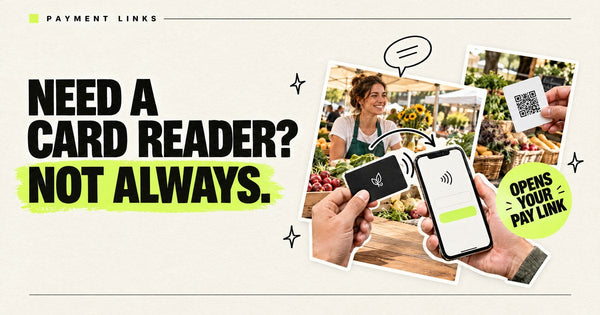
An NFC card can open your Square payment link, your Cash App $Cashtag page or your Venmo profile when a customer taps it with their phone. The card does not take payments: it isn't a card reader or a contactless terminal. It's a shortcut that opens your payment link page in the customer's phone browser or app, and they finish paying there. Pocket Factory makes this card for $19 with your logo on it, pre-programmed with your payment link and tap-tested. If you need to accept a customer's credit card by tapping it, that's a different product, such as Square: Tap to Pay on iPhone.
Price: $19 for 1 card (matte; $21 glossy). Matte packs: 2 cards $29, 3 cards $39, 5 cards $59, 10 cards $109, 25 cards $229, 50 cards $399. Glossy packs: $33 to $499. One-time, no subscription; a printed QR backup is included by default. See all prices
Here, the link is your pay link. Pocket Factory: Your business logo on a card. Tap it, it opens your link. The link can be your website, Instagram, Google reviews, booking page, menu or pay link. It's an NFC card with an NTAG215 chip, pre-programmed with your URL, from $19, and you can order just one, with no app or subscription.
Card reader vs. payment link card: what's the difference?
- A card reader or Tap to Pay phone takes the customer's credit or debit card. The customer taps their card on your device.
- A payment link card (this article) holds a web link. The customer taps their phone on your card, your Square, Cash App or Venmo page opens, and they pay on their own phone.
Pocket Factory never touches the money, and there's no Pocket Factory fee on payments. Whatever fees apply are set by Square, Cash App or Venmo. Not sure you need a card reader at all? See do you need a card reader for Venmo or Cash App.
Using a card for optional tips
For a booth-renting stylist, a card at the station can open the stylist’s own payment profile rather than the salon’s account. Label the recipient and service clearly. A simple invitation is enough: “If you would like to leave a tip, this opens my payment page.” Keep tipping optional; employees should check their employer’s tip-handling process before displaying a separate personal link.
If customers use different services, program a page you control that lists the supported payment options. The card still opens only that one page; it does not select an app, calculate a tip or transfer money itself. A printed payment QR code may be sufficient if you do not need a logo card or NFC tap.
Who uses a tip or pay card: people paid or tipped face to face who don't want to carry cash or a card reader, such as food trucks and coffee carts, barbers and stylists (especially booth renters), valets, delivery drivers, buskers, tour guides, event bartenders, dog walkers, cleaners and market vendors who want a backup to cash. Selling at markets or pop-ups? See NFC cards for market and pop-up vendors.
Where to put it: by the mirror at a stylist's station, where the client sees it during the final check; next to the register or the salon's card reader, for customers who want to tip you separately; or flat on a food truck ledge, valet stand or busker's case, where a phone can easily tap it. Say it once and keep it optional: "If you'd like to leave a tip, you can tap here."
Check the recipient and public profile
Open the exact link from another phone and confirm the displayed recipient, photo or business name before ordering. Review any public profile details and privacy settings with the payment provider before displaying the card. The card does not hide the recipient or make a payment private. Customers review and complete the payment on their own phone; check receipt separately in your provider account.
Provider references: Venmo business-profile marketing settings and payment privacy for buyers, checked October 21, 2026.
Which payment link goes on the card?
| Square payment link | Cash App | Venmo (business profile) | |
|---|---|---|---|
| Link to put on the card | A payment link you create in Square Dashboard or the Square app, copied with Share | Your $Cashtag URL: https://cash.app/$yourcashtag | What Venmo's share option gives you from Charge > QR Code > Venmo Me |
| What the customer sees | A Square checkout page; cards accepted automatically, plus Apple Pay, Google Pay or Cash App Pay if you turn them on | A page where they can pay you | Your Venmo profile to send a payment |
| Fixed amount? | Yes, if you set one (Sell an item); optional tipping | Cash App request links carry a pre-filled amount and note and are reusable | Venmo offers price-specific QR codes; the payer can edit the amount |
| What breaks the card | Deactivating or deleting the link | Changing your $Cashtag (old ones go inactive; you can change it only twice, but can switch back to a previous one) | Not covered in Venmo's help; re-test the card after any username change |
| Provider docs | Square Support: Create and share payment links; Square Support: Customize payment link settings | Cash App Support: What is a $Cashtag?; Cash App Support: Change your $Cashtag; Cash App: payment links | Venmo Help: QR codes for business profiles; Venmo Help: personal QR codes |
Read on the providers' own help pages October 17, 2026, 5:07 AM ET. Fees are set by each provider, not by the card; check your account's fee page.
Square is the most flexible: its help center says you can create a link to collect a payment, sell an item or accept a donation, turn on tipping, redirect to your website after checkout, and choose which digital wallets to accept (Square Support: Create and share payment links, Square Support: Customize payment link settings). Cash App gives every $Cashtag a shareable payment URL, and its request links open a pre-filled payment and can be reused (Cash App Support: What is a $Cashtag?, Cash App: payment links). Cash App also says someone without the app can pay a request link with Apple Pay or Google Pay (Cash App: how to send and receive money). Venmo's help pages describe sharing your business profile's QR code from Charge > QR Code > Venmo Me (by text, email and more) and say your profile can be shared outside Venmo; they don't publish a link format, so test whatever the share option gives you before you order (Venmo Help: QR codes for business profiles, Venmo Help: business profiles FAQ).
Reusable payment link or customer-specific invoice?
For a counter card used by many customers, choose a checkout intended for repeated use. Square Payment Links supports collecting payments from multiple customers through one link. For a particular customer's balance, due date or job, use your invoicing workflow and share that invoice directly with the intended customer; Square's invoice guide distinguishes customer details, line items, due dates and delivery options.
Do not program one customer's invoice URL into a general counter card. Everyone who taps would reach the same destination. The NFC card does not select the right customer, create a fresh invoice or calculate their balance.
- For a fixed-price service, verify the checkout's item and amount before ordering.
- For variable totals, choose a supported buyer-entered amount workflow only if you can check the amount against the sale.
- For individual invoices, keep using direct invoice sharing rather than buying a reusable card for that job.
- Before handing over goods, check the payment in your own provider account. Opening a checkout page is not payment confirmation.
How to put your Square, Cash App or Venmo link on an NFC card
Step 1: Get the payment link from your app
Square: in Square Dashboard go to Payments & orders > Payment links, create a link (for example Collect a payment) and use Share to copy it (Square Support: Create and share payment links). Cash App: your $Cashtag already has a payment URL, https://cash.app/$yourcashtag (Cash App Support: What is a $Cashtag?). Venmo: open your business profile, tap Charge, then QR Code, then Venmo Me, and use the share option (Venmo Help: QR codes for business profiles).
Step 2: Make it a link you won't delete or rename
Square says a deactivated or deleted payment link becomes unavailable to everyone you shared it with, and that can't be undone. Cash App says old $Cashtags become inactive when you change yours. So create a dedicated link for the card and leave it alone.
Step 3: Test it on a phone that isn't yours
Open the link on a phone without your account (ideally without the app). Check that it opens your payment page, shows your business name and lets them pay or enter an amount.
Step 4: Order the card with that link
Upload your logo, paste the payment link, pick matte or glossy and check the preview. Cards have a QR code on the back by default, which opens the same link with a compatible phone camera or QR-scanning app. We program it and tap-test it before it ships.
Step 5: Tap-test it and tell customers what happens
When it arrives, tap it on an iPhone and an Android phone. At the counter, say what to expect: "Tap here, it opens my Square page" (or Venmo, or Cash App). Confirm you've received the payment before they leave.
iPhone XS and newer read NFC cards without an app (Apple's Core NFC documentation); Android phones need NFC turned on (Android's NFC documentation). For phones without NFC, the QR backup on the card opens the same link (see phone has no NFC? Use the QR backup).
Other cards that open a payment link (prices checked live)
| Price for 1 | Shipping (U.S.) | Logo on it? | Who programs it | Change link yourself | |
|---|---|---|---|---|---|
| TAPro NFC Payment Keychain | $24.00–$24.50 depending on the app version (Square $24.50); list price $29 | See their shipping policy | Not stated on the page | A keychain (NTAG215) sold per app: PayPal, Zelle, Cash App, Venmo, Stripe or Square | Yes; seller advertises unlimited reprogramming |
| TAPro NFC Payment Card | $39.90 (list price $59) | See their shipping policy | Not stated on the page | Opens a page with the payment options your business configures | Yes; the seller says the destination can be updated without replacing the card, using the product's setup method |
| Link Tap NFC Business Card | $15, plus $5 per unique link if they program it | $4.99 standard | White card | You (free) or them ($5 per link) | Yes, online |
| Tap Tag Classic Card | $3.95 (V1, select colors), $9.95 (V2), $11.95 holographic | Free tracked U.S. shipping on orders $30+ | Tap Tag branded | You, in their free dashboard | Yes, any time |
| Pocket Factory | $19 matte, $21 glossy | Free U.S. shipping. Most standard orders are expected to be produced and shipped within approximately 3–5 business days; delays are possible. | Yes, your logo and colors | We program and tap-test it | No: cards ship locked, so the link can't be erased or overwritten. Confirm your destination before ordering; ask support about available options if it later changes |
USD prices checked October 21, 2026, 11:16–11:17 PM ET on each seller's own page (Link Tap shipping policy for Link Tap shipping) and the Pocket Factory pricing page. Prices change, so confirm before you buy.
- Tap Tag or Link Tap may fit if you want to manage the destination through their service and do not need a card printed with your logo. Compare the current option and any service terms before buying.
- TAPro offers payment-specific keychains and cards; check the selected product and supported destination before buying.
- The free option: Square lets you share a payment link as a QR code, and Venmo lets you download and print your business QR code as a PDF, at no cost. If a printed QR sign works for you, start there.
- Pocket Factory fits buyers who want their logo on a card programmed with one payment link and tested before it ships, with no Pocket Factory app or subscription.
Running a food truck? A pay card works best by the tip jar, with a separate follow card by the window; see NFC cards for food trucks.
Where Pocket Factory fits
Pocket Factory in one paragraph: Your business logo on a card. Tap it, it opens your link. The card opens one link you choose: your website, Instagram, Google reviews, booking page, menu or pay link. It's a PVC NFC card with an NTAG215 chip, pre-programmed with your URL and tested before it ships, from $19 for one matte card ($21 glossy) down to $7.98 per card in a 50-pack ($399 matte). You can order just one. There's no app, account, subscription or tap analytics. Cards have a QR code on the back by default. It works by tapping a compatible NFC-enabled phone; U.S. shipping is free. Most standard orders are expected to be produced and shipped within approximately 3–5 business days; delays are possible.
| Pack | Matte | Glossy |
|---|---|---|
| 1 card | $19 | $21 |
| 2 cards | $29 | $33 |
| 3 cards | $39 | $45 |
| 5 cards | $59 | $69 |
| 10 cards | $109 | $129 |
| 25 cards | $229 | $279 |
| 50 cards | $399 | $499 |
One-time prices from the live Pocket Factory pricing page, checked October 17, 2026. Free U.S. shipping. Most standard orders are expected to be produced and shipped within approximately 3–5 business days; delays are possible.
Good to know before you order: cards ship locked (read-only), so the programmed link cannot be erased or overwritten. No battery or charging is needed. Confirm your destination before ordering; ask support about available options if it later changes. Details: Can I change the link on my card?.
Because the card ships locked, the payment link must be one you'll keep. If you think you'll switch apps, put a page you control on the card (a pay page on your website listing Square, Cash App and Venmo) and change the buttons there.
FAQ
Can I put a customer invoice link on a reusable payment card?
A general counter card should use a link intended for repeated payments. Share customer-specific invoices directly with the intended customer instead: everyone tapping the same card reaches the same URL, and the card does not create invoices or select a customer balance.
Can an NFC card open my Square payment link?
Yes. Create a payment link in Square Dashboard or the Square app, copy it with Share, and have it programmed on the card. When a customer taps the card, the Square checkout page opens on their phone and they pay there (Square Support: Create and share payment links).
Is a tap-to-pay NFC card a card reader?
No. It can't read or charge a credit card. It only opens your payment link page on the customer's phone. To accept a customer's card by tapping it, you need a card reader or a Tap to Pay feature on your phone from your payment provider.
What is my Cash App payment link?
Cash App says choosing a $Cashtag automatically creates a shareable URL, https://cash.app/$yourcashtag, where customers can pay you. If you change your $Cashtag, old ones become inactive, so a card with the old link stops working.
What link do I use for Venmo?
Venmo's help pages describe sharing your business profile from Charge, then QR Code, then Venmo Me, using the share option. Venmo doesn't publish a link format there, so share it to yourself, open it on another phone to confirm it lands on your profile, and use that link.
Does Pocket Factory take a cut of payments?
No. The card only opens your link. Pocket Factory never processes the payment; Square, Cash App or Venmo set any fees.
What happens if I delete my Square payment link?
Square says a deactivated or deleted payment link becomes unavailable to anyone you shared it with, and that can't be undone. Make a dedicated link for the card and leave it active.
What is Pocket Factory?
Your business logo on a card. Tap it, it opens your link. The card opens one link: your website, Instagram, Google reviews, booking page, menu or pay link. It's an NFC card with an NTAG215 chip, pre-programmed with your URL, from $19, and you can order just one, with no app or subscription. Cards have a QR code backup on the back by default.
Related guides
- NFC cards for food trucks
- Pre-programmed NFC card with your URL
- NFC vs QR code for in-person marketing
- Pocket Factory vs Tap Tag vs GoToTags vs blank NTAG213 cards
- NFC cards with no monthly fee
- Help: phone has no NFC?
- Can I change the link on my card?
- Pricing
Put your logo on a card that opens your pay link, from $19 →